How to Choose the Right Industrial PC for Your Business Needs?
Choosing the right Industrial PC for your business is crucial. Industry expert Dr. James Hudson states, "The right Industrial PC can dramatically enhance operational efficiency." Selecting an Industrial PC involves understanding your specific needs and applications.
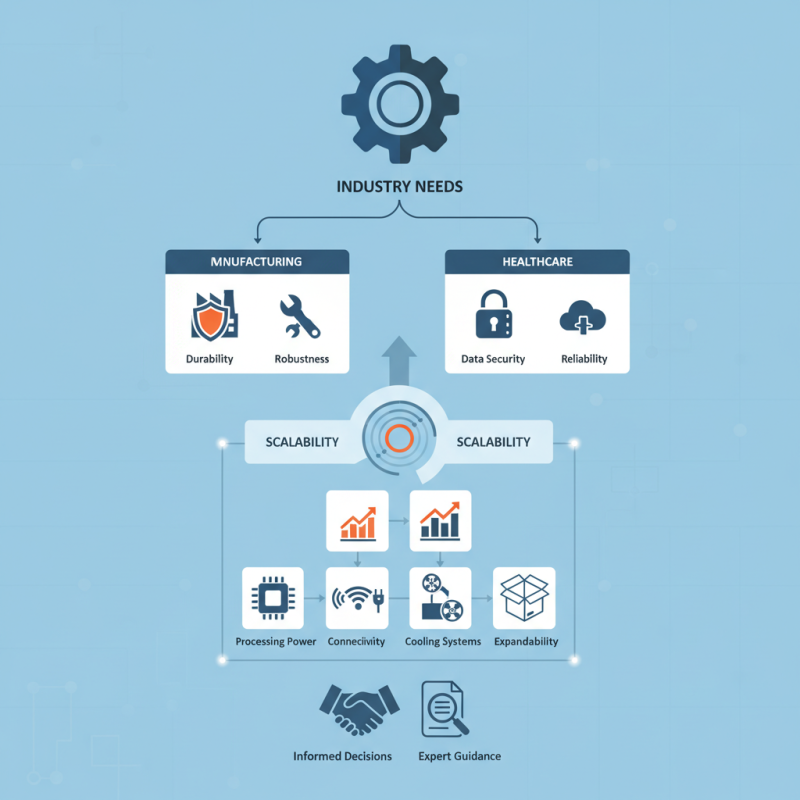
Different sectors demand different features. For instance, manufacturing environments require robust durability. In contrast, healthcare applications often prioritize data security. Many businesses overlook the significance of scalability. Your chosen Industrial PC should adapt as technology evolves and your needs change.
Confusion often arises over specifications. Focusing on factors like processing power and connectivity is essential. However, it's easy to overlook cooling systems or expandability. Every detail matters in enhancing performance and longevity. Trusting the right guidance can be invaluable, leading to informed decisions.
Understanding the Basics of Industrial PCs and Their Applications
Industrial PCs (IPCs) are specialized computers designed for rigorous environments. They are commonly used in manufacturing, automation, and process control. Understanding IPC basics is crucial for businesses choosing the right model. According to a report by MarketsandMarkets, the global industrial PC market is expected to reach $4.63 billion by 2026. This growth reflects their increasing demand across various sectors.
IPCs vary in terms of performance, durability, and operating conditions. They operate reliably under extreme temperatures, vibrations, and dust. Many industries rely on IPCs to enhance operational efficiency. For instance, an Industrial Automation and Control report indicates that IPCs can boost factory productivity by up to 30%. Customization options, such as I/O connectivity and software scalability, allow businesses to tailor IPCs to specific applications.
Challenges exist when selecting an IPC. Potential issues include compatibility with existing systems and long-term maintenance needs. It's essential to evaluate the total cost of ownership, which includes initial purchase, upgrades, and tech support. A thorough analysis can safeguard against missteps. Ensuring the right fit for applications is vital; otherwise, companies might face costly setbacks.
Understanding Industrial PC Performance Metrics
This chart illustrates key performance metrics of industrial PCs essential for various applications. It includes processing power, RAM, storage capacity, and operating temperature range, allowing businesses to make informed decisions based on their specific requirements.
Identifying Your Business Requirements for Industrial PC Selection
Industrial PCs play a crucial role in various sectors. Choosing the right one starts with understanding your business requirements. What tasks will the PC perform? Consider the specific applications your operations rely on. For example, real-time data processing might need faster CPUs and more RAM. Conversely, simpler tasks may require less power.
Next, think about your environment. Will the PC be exposed to dust, moisture, or extreme temperatures? If so, ruggedized models become essential. They can withstand harsh conditions, ensuring reliability. Additionally, consider expandability. Will you need to add more ports or drives later? Think about future needs, not just current requirements.
Lastly, evaluate the support and warranty options available. Reliable manufacturers often provide comprehensive service plans. A less recognized supplier might tempt you with lower prices, but think twice. Consistent support can save you money in the long run. In the end, reflection is vital. Take time to analyze your choices. What worked before? What didn't? Use that insight to make a well-informed decision.
Key Features to Consider When Choosing an Industrial PC
Choosing the right industrial PC for business is crucial. Proper evaluation of key features can greatly impact operations. One primary aspect is processing power. A robust CPU will ensure efficient task execution. Multi-core processors are often preferred for handling simultaneous operations smoothly.
Another critical feature to consider is durability. Industrial PCs face harsh environments, including dust, humidity, and temperature fluctuations. Look for units with solid enclosures and dust filters. This can prevent failures over time. Reliability in performance is paramount, as downtime can lead to significant productivity losses.
Connectivity options also matter. Ensure the device supports various input and output interfaces. This flexibility allows seamless integration with existing systems. Finally, assess the available support and maintenance. Reliable technical assistance can be a game-changer in troubleshooting issues. Investing time in research and evaluation will yield better long-term results.
Evaluating Performance Specifications and Reliability Standards
When selecting an industrial PC, performance specifications and reliability standards are crucial. According to industry reports, about 40% of businesses experience downtime due to inadequate hardware. This highlights the importance of choosing a system that meets your operational demands.
Performance specifications can include processing power, RAM, and storage capacity. A survey by TechTarget found that 70% of manufacturers require multicore processors to handle complex tasks efficiently. Additionally, consider storage type. SSDs offer faster access times compared to traditional HDDs. This can significantly impact overall system responsiveness.
Reliability standards are equally important. The MTBF (Mean Time Between Failures) metric often helps assess longevity. A study indicated that industrial PCs with an MTBF of over 50,000 hours can save companies up to 30% in maintenance costs. Also, ensure your system can withstand environmental factors like temperature and humidity. Many businesses overlook this, leading to premature hardware failure.
How to Choose the Right Industrial PC for Your Business Needs?
| Specification | Standard | Description |
| Processor | Intel i5/i7 or AMD Ryzen | Suitable for applications requiring moderate to high processing power. |
| RAM | 8GB - 32GB | More RAM allows for better multitasking and handling of demanding applications. |
| Storage Type | SSD or HDD | SSDs offer faster data access speeds, while HDDs provide larger storage capacity at a lower cost. |
| Operating Temperature Range | -20°C to 70°C | Important for industrial environments with extreme temperature variations. |
| Power Supply | Wide Input Voltage (AD/DC) | Ensures functionality in varying power conditions. |
| IP Rating | IP65 or IP67 | Resistance to dust and water, suitable for harsh environments. |
| Compliance Standards | CE, FCC, UL | Ensures product safety and electromagnetic compatibility. |
Budgeting and Cost Considerations for Industrial PC Investments
Budgeting for an industrial PC can be challenging yet crucial. Understanding your specific needs is essential. A high-performance system might be necessary for complex applications. However, some businesses might only require basic functionalities. Evaluating these needs helps in defining the budget effectively.
Cost considerations extend beyond the purchase price. Maintenance, upgrades, and potential downtime should be factored in. A cheaper model may lead to higher long-term costs. An unreliable system can disrupt operations. Additionally, investing in training for staff can add to initial expenditures.
Research is vital in this process. Price ranges can greatly vary. Seek out detailed specifications and compare different models. Sometimes, a mid-range option may offer the best balance. It’s also wise to consider future scaling. Can the chosen model adapt to your growth? Reflecting on these aspects may save money in the long run.